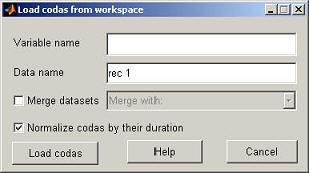
Variable name / File name
Loading from workspace - this is the name of the variable that holds the coda intervals, the workspace variable should either be a double matrix with the rows containing the codas and columns the pulse intervals, or a cell-array where every index in the cell-array contains a similar matrix (this allows to import several coda lengths at the same time).
Loading from file - this should be the name of the file with the coda data, every line in the file should contain one coda, the time intervals can be separated by a comma, or another character recognized by the Matlab import wizard. In order for Matlab to import the file correctly it might be best to pad every line to the maximum coda length in the file (see test_data.csv for an example). The codas do not have to be ordered by length.
Data name
This is the name of the data as used by the analyzer.
Merge datasets
If data is spread of several files this option can be used to add the new codas to an existing dataset.
Normalize codas by duration
When set all codas are normalized by their respective lengths. This should be set in order to analyze coda rhythm.
Load codas
Loads the coda set as specified in the variable or file name and returns to the main window.
Cancel
Returns to the main window without loading coda data.
Help
Opens the help pages.
Click here to go to the main index.